What is Gemini CLI and why Google opened it to the world
The terminal is a second home for developers. That is why Google introduced Gemini CLI in June 2025 — an open-source AI agent under the Apache 2.0 license that brings the power of Gemini models directly to the command line. Since then, the tool has gained over 103 thousand stars on GitHub and has become one of the most watched projects in the field of developer AI tools.
Gemini CLI is not just another chatbot in a browser window. It is a full-fledged agent that understands the structure of your project, can manipulate files, run shell commands, search for current information on the internet via Google Search, and even generate images or videos using integrated Imagen and Veo tools. And because it is an open-source project, anyone can check its source code, contribute to its development, or customize the tool to their own needs.
Unlimited limits for individuals — truly free
The most significant advantage of Gemini CLI is its pricing policy. For individual developers, simply logging in with a personal Google account gives you free access to Gemini 2.5 Pro with a context window of one million tokens. The limits are record-breaking: 60 requests per minute and 1,000 requests per day completely free.
For comparison: the free version of GitHub Copilot offers only 50 agent or chat requests per month and 2,000 automatic code completions. Claude Code from Anthropic, although it belongs among the most powerful tools of its kind, requires a Pro subscription for $20 per month ($17 with annual billing). Gemini CLI thus represents the most financially accessible path to agent AI for hobby developers, students, and independent professionals.
For teams and companies with more advanced requirements, paid options are available through Google AI Studio or Vertex AI on a pay-as-you-go basis, or via Gemini Code Assist Standard and Enterprise licenses with expanded limits and enterprise security.
What Gemini CLI can do
The tool is designed as a universal terminal assistant. It can handle not only writing and fixing code, but also deeper research, task management, and content generation. Its key capabilities include:
Code understanding and editing: Gemini CLI analyzes entire codebases, generates new applications from PDFs, images, or sketches using the multimodal capabilities of Gemini models, and helps with debugging errors through natural language.
Automation and integration: The tool can be run in non-interactive mode inside scripts, allowing AI to be incorporated into CI/CD pipelines or automated workflows. It also supports Model Context Protocol (MCP) for connecting external servers and extending functionality.
Real-time web information: Thanks to built-in Google Search integration, the agent can draw current data from the internet and verify facts in real time.
Project customization: Using GEMINI.md files, you can define conventions, architectural rules, and workflows specific to your project. The agent remembers and follows these instructions across conversations.
Major update v0.40.0: memory, security, and local models
At the end of April 2026, the team released a major update v0.40.0 bringing over 150 improvements. The most significant new features include a complete rebuild of the memory architecture, experimental support for local Gemma models, and a range of security enhancements.
Tiered Memory System divides the agent's memory into four layers: Project (team conventions in the ./GEMINI.md file), Subdirectory (specific instructions for parts of the project), Private (personal notes in MEMORY.md), and Global (cross-project preferences in ~/.gemini/GEMINI.md). This approach replaces the old closed memory system with a transparent solution based on markdown files that developers have full control over.
Auto Memory is an experimental feature that automatically extracts recurring procedures from conversation history and stores them as reusable skills. A specialized agent analyzes local chat history, identifies common workflows, and suggests recording them in SKILL.md files.
Local Gemma brings initial support for running Gemma models locally, currently used for intelligent routing of requests between local and cloud models. Full local execution is on the roadmap for future releases.
From a security perspective, the update introduced stricter validation of shell commands, a whitelist of basic tools to prevent injections, safer loading of working environments, and better sandboxing for Docker or macOS Seatbelt. Developers thus have greater assurance that the agent will not perform unwanted or dangerous operations.
Gemini CLI versus competition: when to choose which agent
The choice of a terminal AI agent depends on the developer's priorities. Gemini CLI excels particularly in the generosity of its free tier and code openness. Claude Code from Anthropic offers top-tier code quality and deep IDE integration, but at the cost of a monthly subscription. GitHub Copilot CLI is a good choice for teams already invested in the GitHub ecosystem, but its free plan is significantly more limited.
Gemini CLI is also tightly linked with Gemini Code Assist — Google's AI coding assistant for VS Code. Developers can thus seamlessly switch between the terminal and editor with a consistent model and shared history.
Availability for Czech and European developers
Gemini CLI is globally available and Czech developers can use it without geographic restrictions. Installation is simple via npm, Homebrew, or MacPorts. The only requirement is a Google account. The tool supports communication in Czech, although it is primarily optimized for English technical terms, which is common for all current AI coding assistants.
From a regulatory perspective, standard Google terms apply for using Gemini cloud models within the EU. For enterprise deployment, Vertex AI offers advanced security and compliance features including data management in European regions.
How to get started
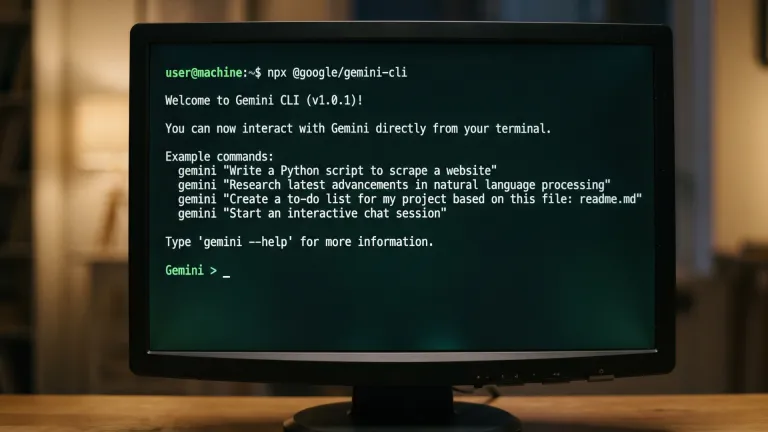
Installation takes less than a minute. The easiest way is via npx without the need for global installation:
npx @google/gemini-cli
Alternatively, it can be installed globally via npm (npm install -g @google/gemini-cli), Homebrew (brew install gemini-cli), or MacPorts. After the first launch, simply choose to log in with a Google account and you immediately have an agent with access to the most powerful Gemini models.
Can I use Gemini CLI without an internet connection?
Basic functions require a connection to Google's cloud models. However, version v0.40.0 brings experimental support for local Gemma models for request routing, and full offline execution is planned for future updates. For offline project search, ripgrep binaries are already included in the package.
What data about my code does Google store when using the free version?
Google declares that data from Gemini Code Assist Business and Enterprise is not used for model training. For individual free users, interactions may be used to improve services, but privacy settings can be managed in the Google account. Thanks to the open-source nature of Gemini CLI, paranoid developers can verify what information the tool actually sends.
Is Gemini CLI suitable for non-technical users as well?
Although it is primarily designed for developers, its natural language control allows it to be used for simpler tasks such as document analysis, file organization, or internet research. However, basic knowledge of working in the terminal is essential for comfortable use. For complete beginners, the web interface of the Gemini app may be more accessible.