Why exactly 24 GB?
At first glance it looks like a random number. In reality, it is the first natural threshold where so-called 27B to 31B dense models fit on common hardware — neural networks with 27 to 31 billion parameters. This is a category that until recently belonged exclusively to data centers. Today we encounter it in home offices.
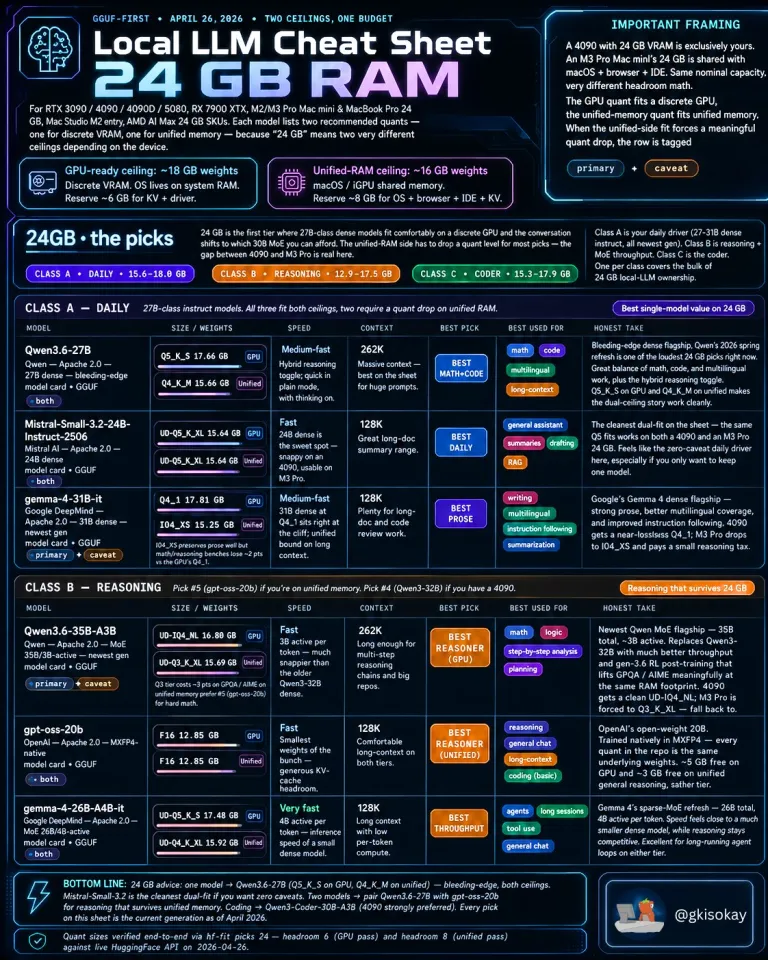
The author of the overview, known by the nickname @gkisokay, divides devices into two camps. The first are classic gaming graphics cards with dedicated video memory — for example RTX 3090, RTX 4090, RTX 5080, or RX 7900 XTX. These offer roughly 18 GB free for the model itself, because the operating system and drivers live on separate system RAM. The second camp consists of Apple computers with unified memory — Mac mini M2/M3 Pro, MacBook Pro 24 GB, or Mac Studio. There the entire system including the browser and development environment shares the memory, leaving approximately 16 GB for the model. And it is this difference that determines which quantized version of the model you can afford.
What is quantization and why does it matter?
Every large language model in its original form is a huge file of numbers — parameters. For a 30-billion-parameter model in full precision (16-bit) you would need over 60 GB of memory. That is beyond the capabilities of common hardware. Quantization means that these parameters are shrunk to lower precision — say 4 bits instead of 16. The result is a model that takes up a quarter of the space, while the quality loss is often minimal, especially with modern methods like Q4_K_M or Q5_K_S.
It is precisely the choice of quantization that decides whether the model will start up, or whether your computer will begin to choke. The cheat sheet therefore lists the recommended quantization for each model both for GPUs with dedicated VRAM and for unified-memory systems.
Class A: Daily Driver — models for everyday use
This category includes three strong candidates that have one thing in common: they are dense models that do not need any complex tricks like a mixture of experts. All three fit into both memory types, although on a Mac with unified memory you occasionally have to reach for a slightly lower quantization.
Qwen 3.6 27B
Alibaba's flagship model is perceived as the best compromise of mathematics, code, and multilingualism in this class. In Q5_K_S quantization it takes up 17.66 GB on a GPU, on a unified system Q4_K_M at 15.66 GB is sufficient. It has a context window of 262 thousand tokens, which means you can feed it an entire technical document or a long legal text at once and the model will not get lost in it. For Czech users it is interesting that the Qwen family has strong support for Czech and Slovak language variants.
Mistral Small 3.2 24B
The French company Mistral AI built this model as a purebred daily assistant. In the UD-Q5_K_XL version it takes up 15.64 GB on both platforms, making it the cleanest dual hit in the entire overview. It is fast, has a 128-thousand-token context, and excels at summarizing long documents and generating text. If you want just one model on your disk that handles everything from chat to transcription of notes, Mistral Small is according to the author of the overview the safest bet.
Gemma 4 31B
Google DeepMind offers its flagship Gemma 4 in a 31B configuration as the best choice for writing and multilingual translation. On a dedicated graphics card it runs in Q4_1 quantization (17.81 GB), on a Mac you have to reach for I-Q4_XS (15.25 GB), which comes with a slight tax in the form of a minor drop in mathematical abilities. Nevertheless, it is a great model for editors, copywriters, or students who need a linguistically confident partner. Gemma 4 also has very good support for European languages including Czech.
Class B: Reasoning — when you need to think
The second class is intended for users who want from the model logical chains, mathematical analysis, or planning of complex tasks. Here we already encounter mixture-of-experts (MoE) models, which can efficiently save computational power by activating only a subset of parameters for each token.
Qwen 3.6 35B A3B
Alibaba's flagship MoE model offers a total of 35 billion parameters, but only 3 billion are active during inference. Thanks to this, in UD-IQ4_NL quantization it takes up only 16.80 GB on a GPU and still offers a 262-thousand-token context. The author of the overview calls it the best model for logical reasoning in this memory class, which significantly improves results on mathematical benchmarks such as GPQA or AIME compared to the previous generation.
GPT-OSS 20B
The smallest representative of this class, but all the more interesting. OpenAI released this model as an open-weight in MXFP4 format, which is a relatively new numeric format. It takes up only 12.85 GB, so it fits even on unified-memory systems with room to spare. It has a 128-thousand-token context and according to the overview it is a great model for general chat and long conversations. It is also an excellent choice for beginners who do not want to occupy their entire graphics memory with a single model.
Gemma 4 26B A4B
Google also offers a sparse version of Gemma 4 with a total of 26 billion parameters, of which 4 billion are active. Its main advantage is speed — fewer active parameters per token, so inference runs faster than with dense models of similar size. On a GPU it takes up 17.48 GB, on unified memory 15.92 GB. It is ideal for long agent loops and tool use, where the model repeatedly calls functions and works with external data.
What does this mean for the Czech user?
For the average AI enthusiast in the Czech Republic, this overview has concrete impacts. The RTX 4090 with 24 GB VRAM is currently sold on the Czech market for around 45 to 55 thousand crowns (price varies by manufacturer and current exchange rate). It is indeed an investment, but still significantly less than an annual subscription to cloud APIs for intensive use. If you prefer the Apple ecosystem, the Mac mini M4 Pro with 24 GB unified memory starts at roughly 35 thousand crowns and offers silent operation with minimal energy consumption.
Software for running these models is available for free today. Ollama is the easiest way — just one command in the terminal and the model downloads and configures itself. For those who prefer a graphical interface, there is LM Studio or Jan, which allow downloading models from Hugging Face and chatting with them locally. For advanced users there is llama.cpp or koboldcpp, which offer maximum control over quantization and inference parameters.
All mentioned models — Qwen, Mistral, and Gemma — are multilingual and handle Czech at a very decent level. They do not reach the quality of the largest proprietary models like GPT-4.5 or Gemini 2.5 Pro in translating complex legal texts, but for everyday communication, writing emails, document analysis, or programming they are more than sufficient. And most importantly: they run locally, data never leaves your computer, and you do not pay per token.
How to choose a model by purpose?
The author of the overview offers clear advice at its end. If you want just one model for everything, choose Qwen 3.6 27B in version Q5_K_S (on GPU) or Q4_K_M (on unified memory). According to him it is the most universal choice in this class. If you need a clean daily assistant without compromises, go for Mistral Small 3.2 24B. For writing and language work, Gemma 4 31B is ideal.
In the area of logical reasoning, Qwen 3.6 35B A3B leads on a graphics card with dedicated memory, while on a Mac with unified memory the better choice is GPT-OSS 20B, which fits without compromises. Programmers should watch a separate Class C (Coder) category, which in the overview includes specialized models like Qwen 3 Coder 30B A3B.
Conclusion
The summary from @gkisokay proves that 24 GB is today a ticket into the world of truly large local models. Just two years ago a hobby developer could run at home models with a maximum of 7 to 13 billion parameters. Today they have 27B to 35B models at their fingertips that in quality approach cloud services of the previous generation. And all of this without the need to send their data to foreign servers.
For the Czech community it is an invitation to experiment. Whether you are a developer, student, journalist, or just a curious enthusiast, the tools are available today, the models are free, and the hardware that can handle it all fits under a desk.
Do I absolutely need a graphics card to run LLMs locally, or is a processor enough?
A graphics card with sufficient VRAM is significantly faster, but models can also be run on a processor. With 24 GB of system RAM and CPU inference you will wait tens of seconds for a response instead of a few seconds. For real-world use it is worth investing in a GPU or a Mac with Apple Silicon.
What is the difference between Q4_K_M and Q5_K_S quantizations?
Q5_K_S uses 5-bit precision and usually preserves slightly more quality than Q4_K_M, which uses 4 bits. On the other hand, Q4_K_M takes up less memory. For ordinary chat the difference is often unnoticeable; in mathematical tasks and coding a minor drop in accuracy may appear with Q4.
Do I have to pay for using Qwen, Mistral, or Gemma when I run them locally?
No. All mentioned models have open weights and when running locally you pay no fees. The only costs are the purchase price of the hardware and electricity. The exception would be commercial use under some licenses, but for personal use they are completely free.